


Table of Contents
The Challenge for Business Analysts: Getting Answers Faster from Data
Business Analysts (BAs) often need to:
- Querying data efficiently for validation, bug confirmation, and requirement analysis.
- Preparing realistic test data for UAT, demos, or troubleshooting without exposing sensitive information.
Consider this scenario: You’re in the middle of a sprint review, and the client asks, “Do you know how many orders were placed via the new feature after its release last month?” Without quick access to data, you either wait for a developer or scramble to write a query under pressure.
Or imagine testing a new feature. You need sample data to validate a bug fix, but creating it manually or writing complex INSERT statements eats up valuable time.
For some (BAs), especially those without much technical experience, may find SQL challenging. Writing SQL meant memorizing JOIN clauses, aggregation functions, and debugging syntax errors. Creating test data meant manually crafting INSERT statements or waiting for QA teams to seed environments. Both were time-consuming and frustrating.
Before You Start: Get Approval to Use AI on Client Data
Why This Matters: Before using AI tools to query or generate test data, Business Analysts need proper authorization. Skipping this step can lead to compliance issues, data privacy violations, and loss of client trust. Always make sure your approach aligns with company and client security policies.
Best Practice: Always secure explicit approval from both your client and your manager before applying AI solutions to any client database.
Checklist before using AI:
- Obtain permission or formal approval from both the client and your manager.
- Verify that the AI tool complies with organizational and client-specific security and privacy policies.
- Ensure that no sensitive or proprietary data will be exposed or compromised during processing.
How AI Makes SQL Easy for Business Analysts
With AI, the friction of writing SQL disappears. You do not need to memorize SQL or become an expert overnight. Simply use a natural language prompt in plain English, and AI can turn it into a ready-to-use SQL script in seconds, so you can move forward with requirement analysis, test data preparation, or issue validation.
AI delivers actionable insights without waiting for technical teams. This helps BAs understand data more effectively and provides strong support in decision-making. Think of it as an efficient shortcut to unlock the data you need, faster and with less stress. Golden rule: trust but verify.
Turn Natural Language into SQL for Faster Insights
Instead of writing complex queries from scratch, simply describe your goal in plain language, and AI will write the query.
Example A: Spot-Checking User Segments
Prompt: “Show me active customers who signed up in the last 30 days and spent more than $100 in the last 30 days. The tables are customers, products, and sales using SQL Server.“

You often need to understand data volume or trends. Instead of struggling with syntax, just ask AI in natural language:
Example B: Analyzing Data Volume and Trends
Prompt: “Write SQL script to find the top 5 best-selling products for a given month using SQL Server.“
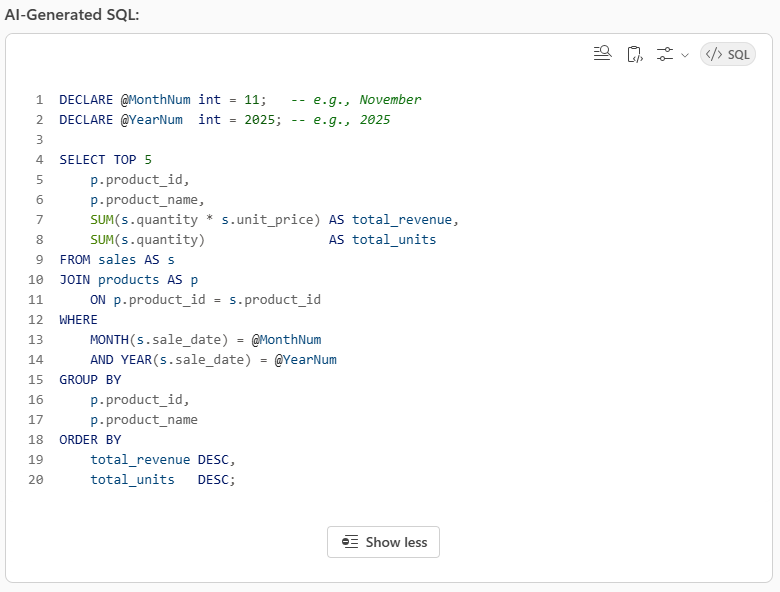
When you need to check data insight for a report. Instead of struggling with syntax, just ask AI in natural language:
Example C: Get answer instantly
Prompt: “How many products have been purchased using the One‑Click Checkout feature since 5 Nov?”
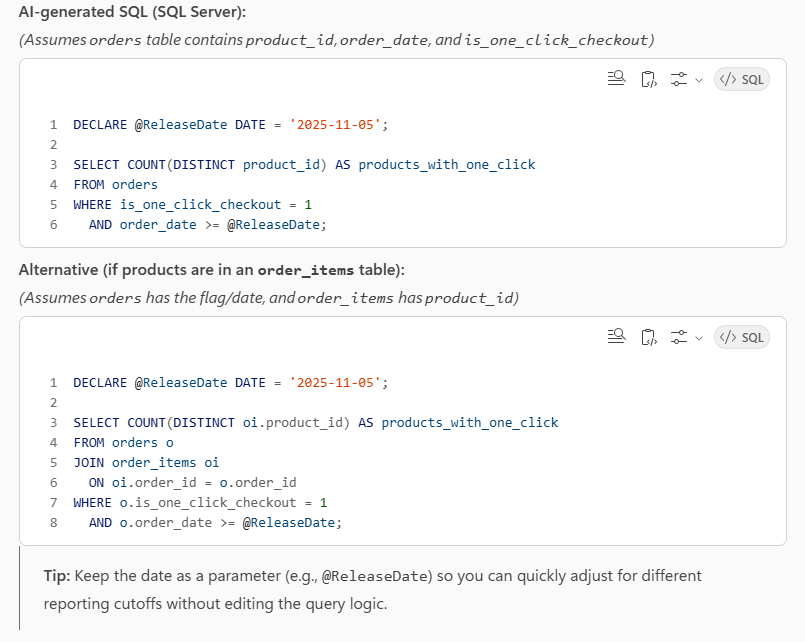
Generate Test Data Quickly
When you need data to validate a scenario, creating test data can be time-consuming. AI makes it simple:
Example: Generate random test data
Prompt: “Write a SQL script to insert 10 random products with name, price, quantity, and category using SQL Server.”
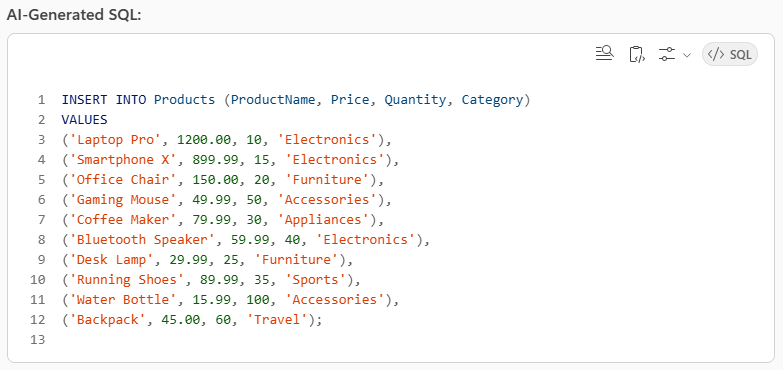
Mask Personal Data for Privacy
Working with sensitive information? AI can help you anonymize data in seconds, keeping customer details secure. This allows you to share samples with stakeholders safely.
Example A: Mask sensitive fields for safe sharing
Prompt: “Create a view that masks email and phone but keeps IDs usable“
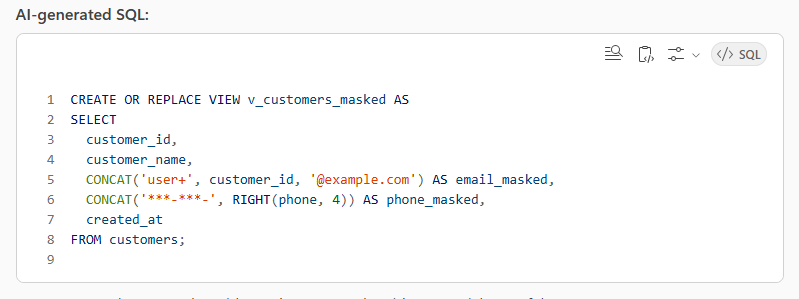
Sometimes you need to anonymize or standardize addresses for testing. You can prepare sanitized data for testing without risking real customer information.
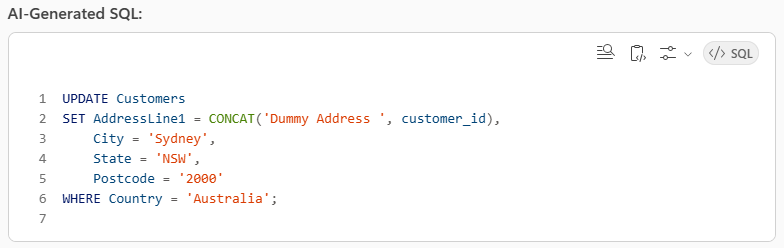
Example B: Update Dummy Addresses for AU Customers
Prompt: “Update all customer addresses in Australia to a unique dummy value for each customer using SQL Server.“
Verify Before You Execute: Safe Querying with AI
AI-generated scripts are powerful, but do not run them blindly. You can ask AI with additional requests in the prompt.
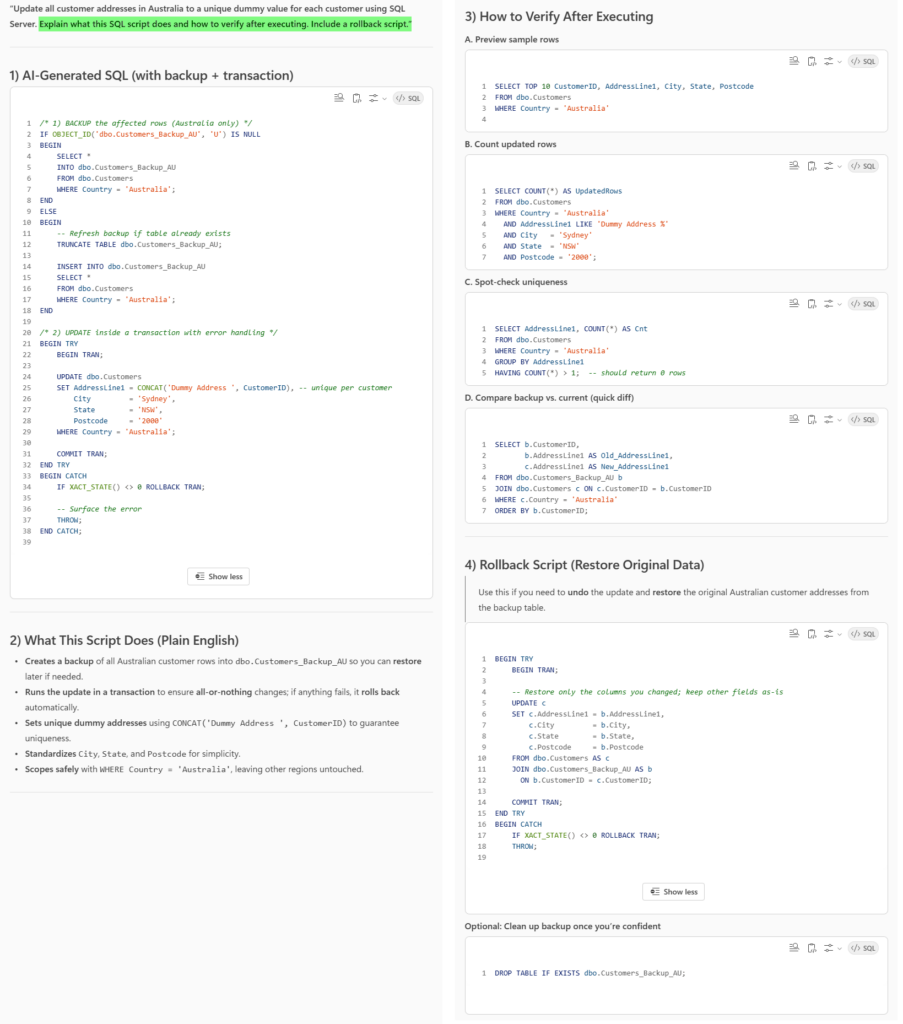
Prompt: “Update all customer addresses in Australia to a unique dummy value for each customer using SQL Server. Explain what this SQL script does and how to verify after executing. Include a rollback script.”
This simple addition ensures you have:
- An explanation of what the script does in plain English (e.g., creates a backup of affected rows, runs the update in a transaction).
- Verification steps (e.g., viewing sample rows, counting updated rows, spot-check uniqueness, comparing backup vs. current).
- A rollback script to restore original data if anything goes wrong.
How to get the best results from AI (BA-friendly tips)
- Provide schema context: Share table names, key columns, and sample rows (e.g., orders(order_id, customer_id, status, order_amount, order_date)).
- State constraints: Databases differ (PostgreSQL vs. SQL Server vs. MySQL). Mention your engine to get correct functions (e.g., DATE_TRUNC vs. DATEPART).
- Be explicit about logic: “Latest by order_date,” “unique customers,” “exclude canceled,” etc.
- Ask for validations: “Add WHERE guards to avoid NULL issues,” “ensure no duplicates,” “handle time zones.”
- Request commentary: “Explain each clause,” “include a rollback script,” “show an index recommendation,” “provide test data + cleanup script.”
- Use the golden rule: Trust, but verify — run in Dev/UAT first, check counts, and compare against a known baseline.
Conclusion: AI Simplifies SQL for Your Shortcut to Smarter Analysis
AI is not here to replace SQL skills – it is here to amplify your impact. For BAs, this means less time wrestling with syntax and more time delivering insights.
Remember the golden rule: Trust, but verify. Use AI to accelerate query generation and test data creation, then validate scripts before final execution to ensure accuracy and reliability.
And one more critical point: Always get client and manager approval before using AI on any database. This step protects privacy, ensures compliance, and builds trust – so your shortcut to smarter analysis stays safe and professional.